Category:Scraping Use Cases
Complete 2026 Amazon Scraping Guide: Product Data, Prices, Sellers, and More

Software Engineer


Amazon is the world's largest marketplace and go-to platform for every e-commerce vendor, especially in the US.
That's why scraping Amazon can provide invaluable data and it's the same reason why scraping it is so difficult...
... but not impossible.
In this guide, we'll scrape simple product pages, product pages with multiple options and numerous variants, and all seller offers from Amazon; unlocking access to millions of Amazon products.
[Plug-and-play codes on our GitHub repo 🧰]
These might help too:
- scrape Amazon search results and sponsored products
- best Amazon scraper APIs
- scrape Amazon reviews
- scrape Amazon best sellers
Does Amazon Allow Scraping?
Yes, scraping Amazon is possible and legal as long as you follow the guidelines and stay away from any login protected personal information. For a broader look at scraping permissions, see how to check if a website allows scraping.
By respecting these rules and ethical scraping practices, you can gather publicly available data without crossing any laws or regulations, however, if you go into detail, it's not that simple.
Amazon's Web Scraping Policy
Amazon's official Conditions of Use explicitly prohibit "the use of any robot, spider, scraper, or other automated means to access Amazon Services for any purpose."
This applies to their Terms of Service, robots.txt, and every other policy document they publish. Amazon has a legal team that actively pursues scrapers and they won't hesitate to send cease-and-desist letters or take legal action if they catch you scraping at scale.
But here's the nuance: just visiting a website doesn't mean you've agreed to their terms. You didn't sign anything. You didn't click "I agree." Courts in multiple jurisdictions have recognized this distinction.
Legal Considerations
Scraping publicly available data has been recognized as legal by courts around the world. The landmark hiQ Labs v. LinkedIn case in the US established that scraping public data doesn't violate the Computer Fraud and Abuse Act. Similar rulings exist in the EU and other jurisdictions.
The key distinction is public vs. private data:
- Public data (product pages, prices, search results) = generally legal to scrape
- Private data (behind login walls, personal information) = off-limits
Amazon's robots.txt outlines which parts of the site are accessible to automated tools. When scraping Amazon:
- Avoid login-protected content like extended customer reviews—these require authentication and are explicitly restricted.
- Stick to publicly accessible pages like product listings, prices, and search results.
Amazon recently moved extended customer reviews behind login walls. This actually clarifies the boundary: if it requires a login, don't scrape it.
Ethical Guidelines
Scraping ethically means balancing your goals with respect for the website's integrity and policies.
Ethical scraping doesn't just help you avoid potential legal pitfalls; it also fosters a responsible approach to data collection.
Here are a few best practices:
- Respect Rate Limits: Sending too many requests in a short period can overwhelm Amazon’s servers. Use delays or throttling to mimic real user behavior.
- Stick to Publicly Available Data: Avoid scraping content that requires login credentials or is marked as off-limits in the
robots.txtfile. - Use Data Responsibly: Whether for analysis or application development, ensure that the data you collect is used in ways that align with Amazon’s guidelines.
To learn more about ethical scraping and the legal landscape, check out this detailed guide on legality of web scraping.
Bypass Amazon AWS WAF
Amazon uses its in-house solution, AWS WAF to protect the platform from bots and scrapers.
Any request you send, whether it's through your Chrome browser or using Python Requests, your IP, headers, and recent activity is analyzed to make sure you're human.
So, how do you make your bot bypass it?
Here are your options, basically:
- Manual methods/in-house solutions: create and maintain a pool of premium proxies and headers to make sure your requests are not flagged.
- Open-source stealth plugins: pick from countless options such as
scrapy-fake-useragent+scrapy-rotating-proxies,camoufox+cheap rotating proxies,rebrowser-puppeteerto go through AWS WAF. These would run locally and cause performance and success rate issues as you scaled, though. - (Method we will also use in this guide) Web scraping APIs: a web scraping API known to handle Amazon persistently such as Scrape.do will handle proxies, headers, and CAPTCHAs for you.
Amazon is not impossible to break for a few scraping requests.
But if you're planning on extracting data from millions of products, you need to think about scalability, as re-using proxies and headers will only get you so far.
Prerequisites
Before we start scraping Amazon, let's set up our environment with the necessary tools.
Install Required Libraries
We'll use two Python libraries for this tutorial:
- Requests: A simple HTTP library that lets us send requests to web servers and receive responses. It handles all the complexities of making HTTP calls behind the scenes.
- BeautifulSoup: A powerful HTML parsing library that makes it easy to extract data from web pages by navigating the document structure.
Install both with a single command:
pip install requests beautifulsoup4Grab a Free Scrape.do Token
To bypass Amazon's WAF (Web Application Firewall), we'll route our requests through Scrape.do.
Can you scrape Amazon without Scrape.do? Yes, but it would require significant effort to build a browser-like scraper that won't get caught by Amazon's anti-bot systems. All the parsing code in this guide would still work—the difference is only in how you fetch the pages.
Here's why Scrape.do makes Amazon scraping easier:
- Automatic WAF bypass: No need to manage headers, cookies, or browser fingerprints
- Proxy rotation: Requests are routed through millions of IPs to avoid rate limiting
- CAPTCHA handling: CAPTCHAs are solved automatically when they appear
For even simpler integration, check out Scrape.do's Amazon Scraper API which returns structured JSON data with ZIP Code based geotargeting and language parameters—no parsing required.
Sign up at scrape.do to get your free API token, then you're ready to start.
Scraping Product Data from Amazon (Basic)
Extracting information from an Amazon product page will be our starting point for this tutorial.
From product prices and images to descriptions and ratings, these pages contain data that can be invaluable for market analysis or application development.
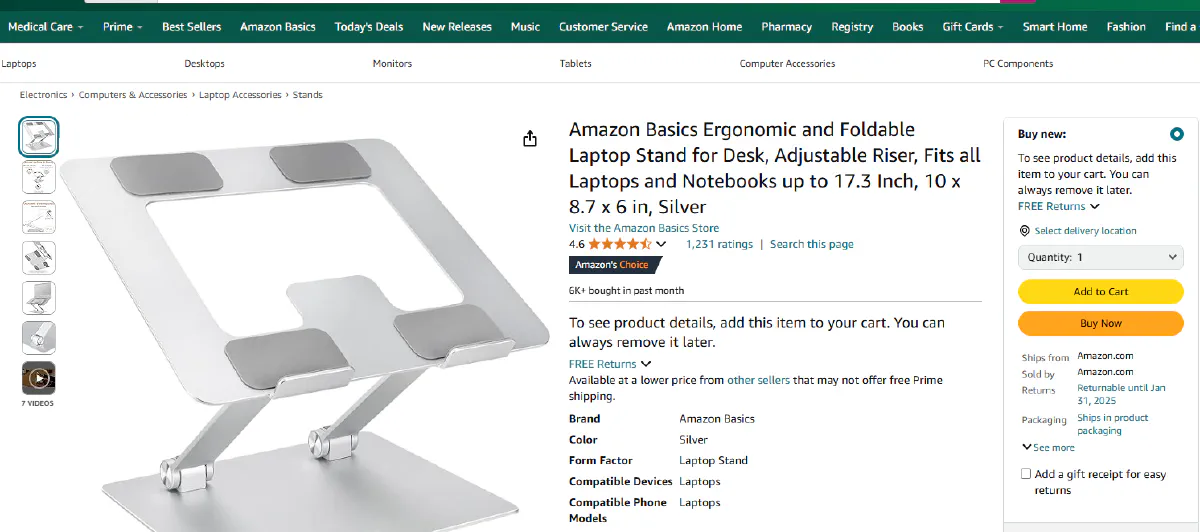
For the scope of this step we will be using this product as an example.
Getting 200 OK from Amazon
We'll focus on getting a successful HTTP response from the Amazon servers. By routing our request through Scrape.do's API, we can effortlessly skip Amazon's WAF protection.
This step would normally be quite complex due to Amazon's advanced protection systems, but with Scrape.do we don't need to handle any bypass mechanisms!
After defining our token and the product URL, we can send our first request:
import requests
import urllib.parse

# Our token provided by 'Scrape.do'
token = "<SDO-token>"

# Amazon product url
targetUrl = "https://www.amazon.com/Amazon-Basics-Portable-Adjustable-Notebook/dp/B0BLRJ4R8F/"

# Use Amazon Scraper API to get contents with geo-targeting
apiUrl = f"https://api.scrape.do/plugin/amazon/?token={token}&url={urllib.parse.quote(targetUrl, safe='')}&geocode=us&zipcode=10001&output=html"
response = requests.get(apiUrl)

print(response)
At this point we should be getting a HTTP response stored in our response variable and if we print it into our console it should be looking like this:
<Response [200]>HTTP response with the 200 code means our request is successful.
We can access the contents of the response by using;
response.textThis will include all of the html contents of the page including any scripts that is available.
If you want; you can print this information on your console to check or even write it into a html file to have a local copy of the product page on your computer.
Our next step will be extracting the information we need from this raw text.
How to Scrape Amazon Product Prices
Price is the most important information about a product, so it will be a nice starting target for us.
For this step we will start using BeautifulSoup because it helps us parse the data we need.
Before starting the extraction process we need to locate the information that is necessary inside the product page we just downloaded. We can either use the response.text that we downloaded in previous step or we can go into the product page and use developer tools to inspect the elements.
You can use F12 to access the developer tools on Google Chrome and press ctrl + shift + c to inspect the element you want.
Or you can click the inspection tool:
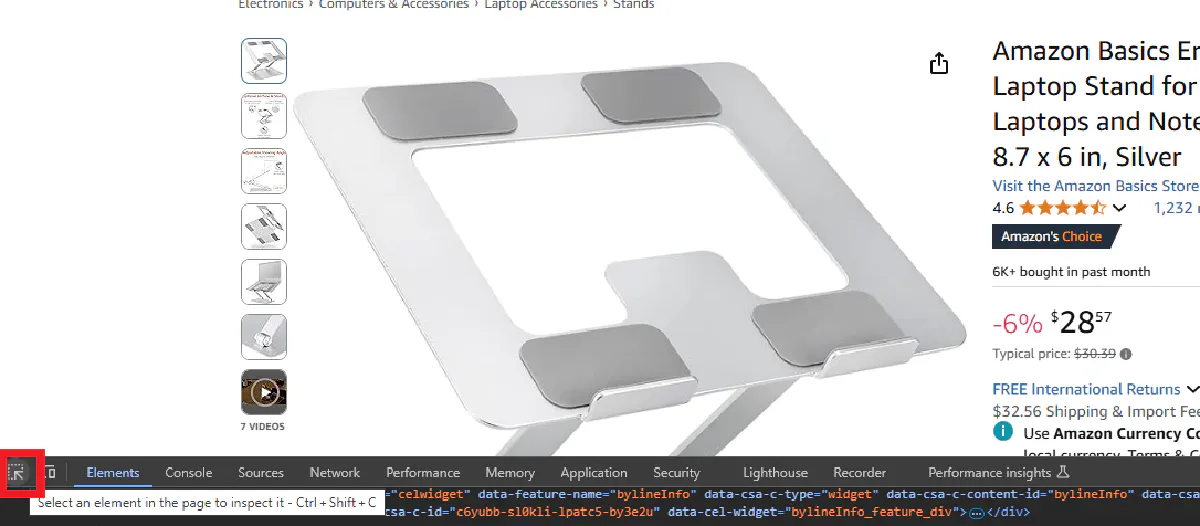
Hover over the price details and you will see that the price is divided into whole section and fraction section:
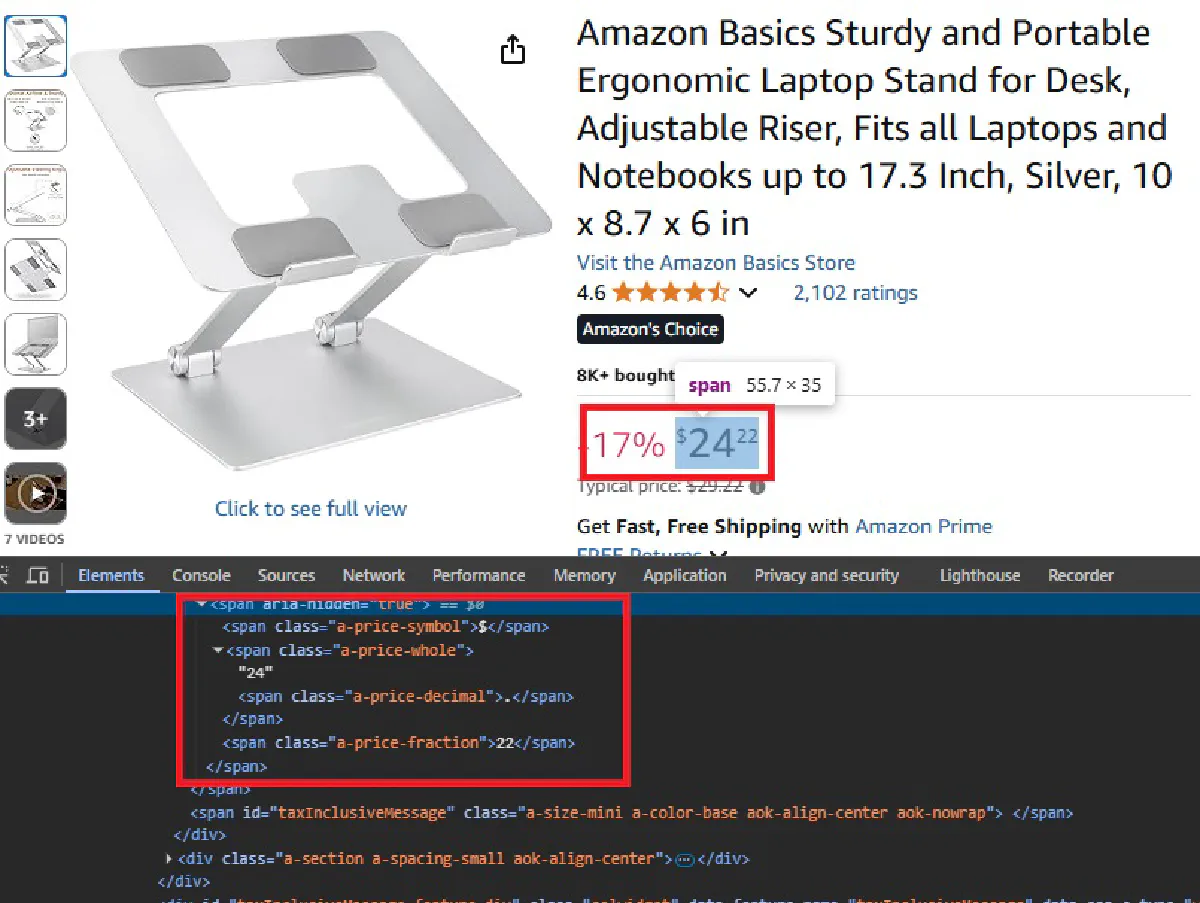
We will use BeautifulSoup to extract price details from both these sections and then put them together:
⚠ Amazon uses different price structures depending on product availability. We need to handle both regular pricing and out-of-stock scenarios, so we'll first see if the item is out of stock and scrape the price only if it isn't.
from bs4 import BeautifulSoup

<-- same as previous step -->

# Parse the request using BS
soup = BeautifulSoup(response.text, "html.parser")

# Extract price with out-of-stock handling
if soup.find("div", id="outOfStockBuyBox_feature_div"):
    price = "Out of Stock"
else:
    whole = soup.find(class_="a-price-whole")
    fraction = soup.find(class_="a-price-fraction")
    price = f"${whole.text}{fraction.text}"

print("Price:", price)
After running this script we should be getting the product price printed on our console, whether it's available or out of stock.
Price: $28.57 or Price: Out of Stock
Scrape Other Product Details
The following steps will be pretty similar to getting the price information.
We will inspect each of the information that we are insterested using the developer tools and we will try to find an encapsulating html object that holds the complete information.
Then with the help of BeautifulSoup we will locate this information inside the response we are getting.
Product Name
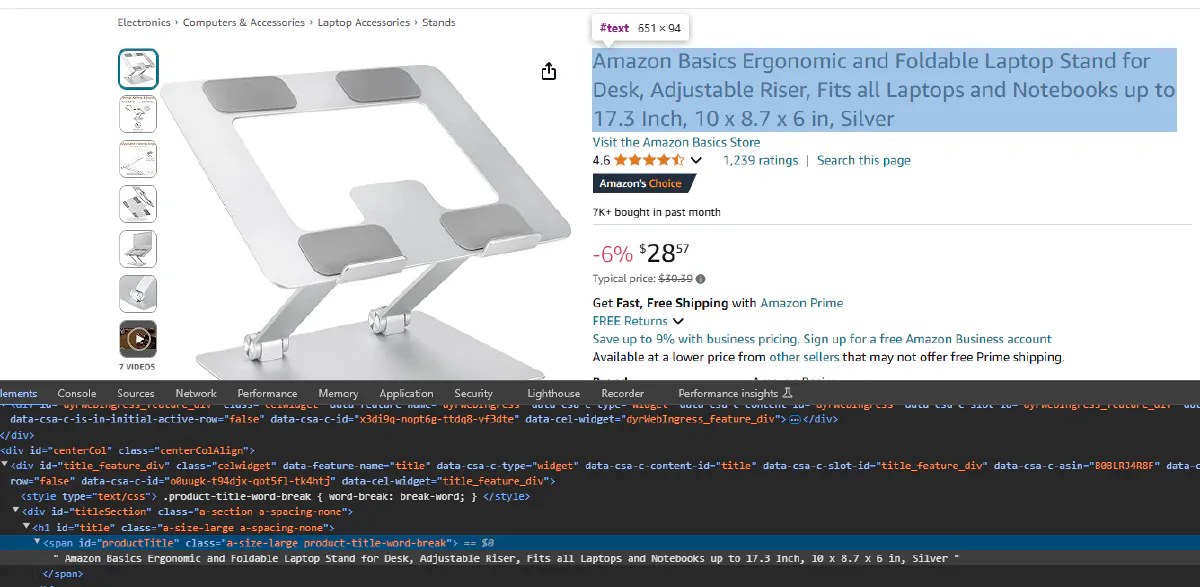
We can see that product name is stored inside a span object with the id productTitle. Again we will access this object with BeautifulSoup and try to print the information inside of it.
name = soup.find(id="productTitle").text.strip()
print("Product Name:", name)
We should be getting product name printed on our console.
Product Name: Amazon Basics Ergonomic and Foldable Laptop Stand for Desk, Adjustable Riser, Fits all Laptops and Notebooks up to 17.3 Inch, 10 x 8.7 x 6 in, SilverProduct Image
It is time for the product image; we will start with inspecting the element again and find the html object containing the product image.
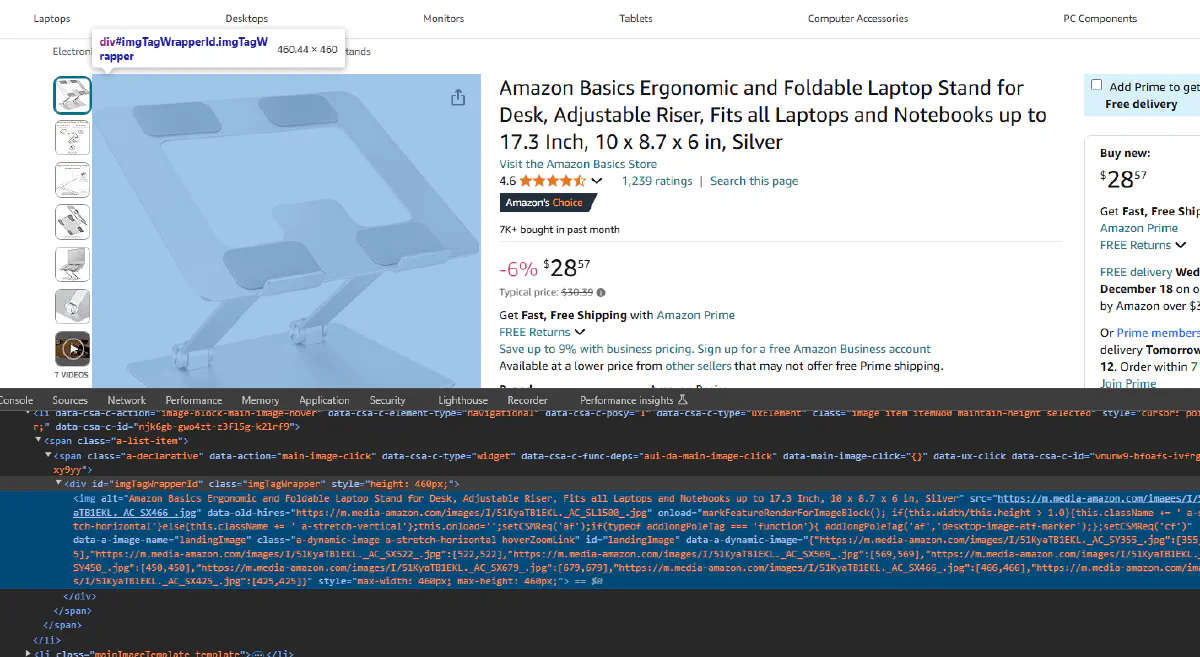
landingImage is the id of the element that contains the image.
But this time we are interested in the src attribute of the object instead of the text, since image url is stored in this attribute. We can find and access to the src attribute of this element using following:
image = soup.find("img", {"id": "landingImage"})["src"]
print("Image URL:", image)
We should be getting the image url printed on our console!
Image URL: https://m.media-amazon.com/images/I/51KyaTB1EKL.__AC_SX300_SY300_QL70_FMwebp_.jpgIt is also possible to download and save this images into your drive but for the scope of this tutorial we will stop here and store the information about product images as urls.
Product ASIN
The ASIN (Amazon Standard Identification Number) is a unique identifier for each product. We can extract this directly from the URL, which is useful for database storage and referencing.
# Extract ASIN from URL
asin = targetUrl.split("/dp/")[1].split("/")[0].split("?")[0]
print("ASIN:", asin)
This will give us:
ASIN: B0BLRJ4R8FProduct Rating
And finally the product rating.
Our first step is again to inspect:
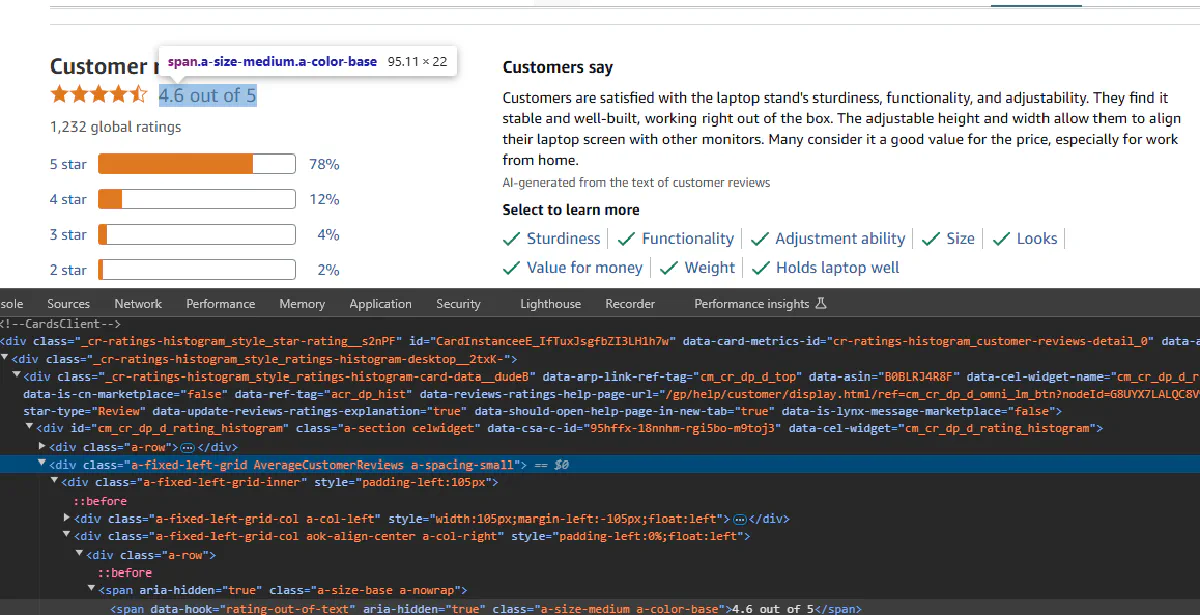
As we can see product rating element is not encapsulated directly under a tag that we can refer to. a-size-medium a-color-base classes are generic classes and will return other objects if we tried to use it.
div object with the AverageCustomerReviews class is something we can easily access and contains all of the information we need but also has information that we don't need.
We will try to get this information and strip the part we are interested.
rating = soup.find(class_="AverageCustomerReviews").text.strip()
print("Rating:", rating)
This will return the following:
Rating: 4.6 out of 5 stars4.6 out of 5This string contains the rating twice, also we don't need to specify it is out 5.
So we are going to split this string and get a single rating score. Let's update our code as follows:
rating = soup.find(class_="AverageCustomerReviews").text.strip().split(" out of")[0]
print("Rating:", rating)
Now we get this:
Rating: 4.6Export to CSV
To make your scraped data actionable and be able to easily scale this up to a thousand products, it’s essential to save it in a structured data format.
So we will export it into CSV which is the most basic format.
You can use libraries like pandas to easily save your data frames into csv files but in this tutorial we will do it without a help of a library, using Python's built-in module.
Let's also use two additional products to make our code loop through URLs.
Here's the final code:
import requests
import urllib.parse
from bs4 import BeautifulSoup

# Our token provided by 'Scrape.do'
token = "<SDO-token>"

# Amazon product urls
targetUrls = ["https://www.amazon.com/Amazon-Basics-Portable-Adjustable-Notebook/dp/B0BLRJ4R8F/",
              "https://www.amazon.com/Urmust-Ergonomic-Adjustable-Ultrabook-Compatible/dp/B081YXWDTQ/",
              "https://www.amazon.com/Ergonomic-Compatible-Notebook-Soundance-LS1/dp/B07D74DT3B/"]

for targetUrl in targetUrls:
    # Use Amazon Scraper API with geo-targeting
    apiUrl = f"https://api.scrape.do/plugin/amazon/?token={token}&url={urllib.parse.quote(targetUrl, safe='')}&geocode=us&zipcode=10001&output=html"
    response = requests.get(apiUrl)

    # Parse the request using BS
    soup = BeautifulSoup(response.text, "html.parser")

    name = soup.find(id="productTitle").text.strip()

    # Extract ASIN from URL
    asin = targetUrl.split("/dp/")[1].split("/")[0].split("?")[0]

    # Extract price
    if soup.find("div", id="outOfStockBuyBox_feature_div"):
        price = "Out of Stock"
    else:
        whole = soup.find(class_="a-price-whole")
        fraction = soup.find(class_="a-price-fraction")
        price = f"${whole.text}{fraction.text}"

    image = soup.find("img", {"id": "landingImage"})["src"]
    rating = soup.find(class_="AverageCustomerReviews").text.strip().split(" out of")[0]
    with open("output.csv", "a") as f:
        f.write('"' + asin + '", "' + name + '", "' + price + '", "' + image + '","' + rating + '" \n')
And voila, information about these 3 products should be saved into our CSV file.
Here's our output:

One API Call, More Data
If you'd rather skip the HTML parsing entirely, Scrape.do's Amazon Scraper API has a dedicated PDP (Product Detail Page) endpoint that returns structured JSON.
One request, all the data:
import requests

token = "<SDO-token>"
asin = "B0BLRJ4R8F"

response = requests.get(
    "https://api.scrape.do/plugin/amazon/pdp",
    params={
        "token": token,
        "asin": asin,
        "geocode": "us",
        "zipcode": "10001"
    }
)

data = response.json()
print(data)
Sample response:
{
  "asin": "B0BLRJ4R8F",
  "name": "Amazon Basics Ergonomic Laptop Stand...",
  "brand": "Amazon Basics",
  "price": 28.57,
  "currency": "USD",
  "rating": 4.6,
  "total_ratings": 12847,
  "is_prime": true,
  "thumbnail": "https://m.media-amazon.com/images/I/...",
  "images": [...],
  "best_seller_rankings": [...],
  "technical_details": {...},
  "status": "success"
}
No parsing required—just pass the ASIN and get back clean, structured product data with pricing, ratings, images, and technical specs.
Scrape All Color,Size,Model Variations of an Amazon Product (Advanced)
Many Amazon products don’t have a single, static price.
The price changes with the option you choose: color, size, style, model and more.
If you only scrape the default page, you’ll miss most of the catalog, so the right way is to discover every available variation and visit each variation’s dedicated URL to read its own price and selected options.
What we’re building below is a reliable (and maybe overengineered) system that:
- Finds all variation dimensions on the base product page (color, size, style, etc.)
- Walks through every valid option combination without duplication
- Reads the selected options on each visited page and grabs prices and product names
- Writes everything into a clean CSV
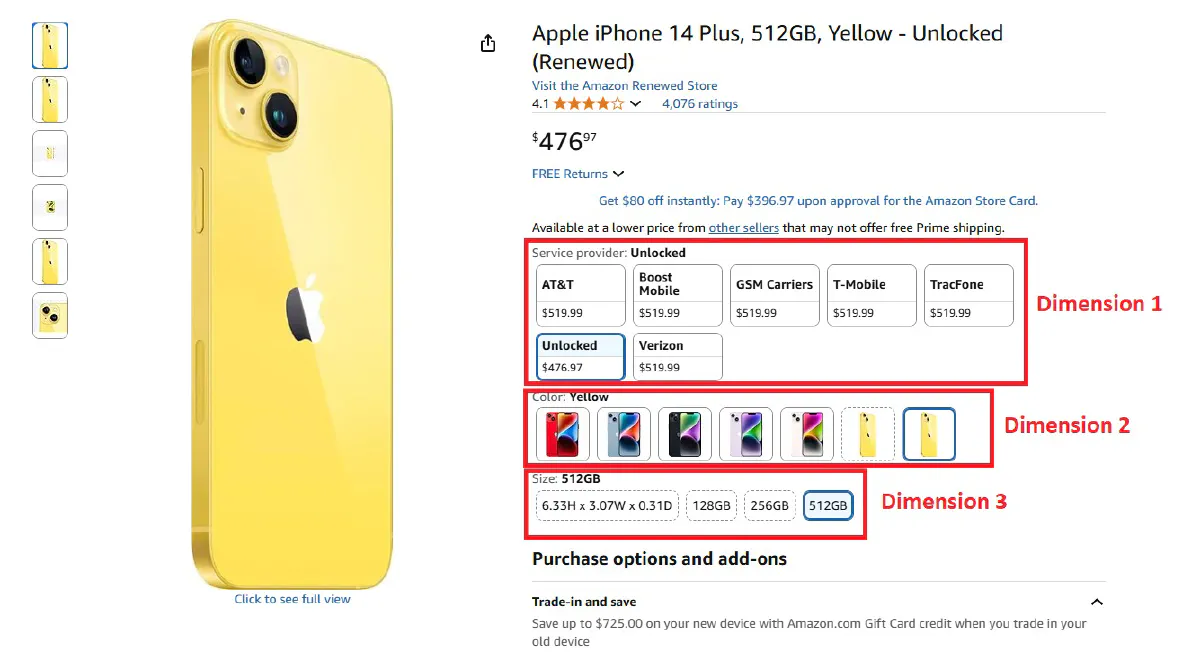
I'm probably picking the most complicated target page possible for this code, but we need our code to work in complex scenarios, so it'll be good practice :)
We'll scrape all colors, storage sizes, and service providers for Apple iPhone 14 Plus here:
Extract All Available Variations
We’ll begin by grabbing the base product page and mapping out the full set of variation dimensions and their options.
First, we build the API request through Scrape.do:
import requests
import urllib.parse
import csv
from bs4 import BeautifulSoup
import re

# Scrape.do token and target URL
token = "<SDO-token>"
PRODUCT_URL = "https://www.amazon.com/Apple-iPhone-Plus-128GB-Blue/dp/B0CG84XR6N/"

# Initial page scrape to find dimensions
api_url = f"https://api.scrape.do/plugin/amazon/?token={token}&url={urllib.parse.quote(PRODUCT_URL, safe='')}&geocode=us&zipcode=10001&output=html"
soup = BeautifulSoup(requests.get(api_url).text, "html.parser")
Scrape.do returns the fully-rendered HTML and handles the heavy lifting (WAFs, geo, headers).
Then, we'll reuse the exact same product name and price logic from previous section: if the out-of-stock container exists, we mark it as such; otherwise we stitch the whole and fractional price.
name = soup.find(id="productTitle").text.strip()
price = "Out of Stock" if soup.find("div", id="outOfStockBuyBox_feature_div") else f"${soup.find(class_='a-price-whole').text}{soup.find(class_='a-price-fraction').text}"
Then, we'll extract all dimension and option names from the select menus.
# Extract available dimensions and options
dimensions = {}
for row in soup.find_all("div", {"id": re.compile(r"inline-twister-row-.*")}):
    dim_name = row.get("id", "").replace("inline-twister-row-", "").replace("_name", "")
    options = []
    for option in row.find_all("li", {"data-asin": True}):
        asin = option.get("data-asin")
        if asin and option.get("data-initiallyUnavailable") != "true":
            swatch = option.find("span", {"class": "swatch-title-text-display"})
            img = option.find("img")
            button = option.find("span", {"class": "a-button-text"})

            option_name = swatch.text.strip() if swatch else img.get("alt", "").strip() if img and img.get("alt") else button.get_text(strip=True) if button and button.get_text(strip=True) != "Select" else "Unknown"
            options.append({"name": option_name, "asin": asin})

    if options:
        dimensions[dim_name] = options

print(f"Found dimensions: {list(dimensions.keys())}")
for dim_name, options in dimensions.items():
    print(f"  {dim_name}: {len(options)} options")
Amazon exposes variation groups in “inline-twister-row-*” containers. Each option usually has:
- A display label from a swatch title, image alt, or button text
- An ASIN we can navigate to (the key to get the correct price for that option)
We skip options that are initially unavailable to avoid dead ends.
We then also set up a sensible traversal order and CSV headers so downstream steps are clean and deterministic.
# Setup dimension traversal order and CSV headers
priority = ['color', 'size', 'style', 'pattern', 'material', 'fit']
dim_names = sorted(dimensions.keys(), key=lambda x: priority.index(x.lower()) if x.lower() in priority else len(priority))
headers = ["ASIN", "Product Name"] + dim_names + ["Price"]
results = []
scraped = set()
Scrape All Product Variations One by One
Next, we’ll recursively walk through the option tree.
For each option, we load its dedicated product page (using the option’s ASIN) and capture both the selected options and the correct price.
# Recursive function to scrape all product variations
def scrape_variations(asin, dim_index=0, prefix=""):
    if asin in scraped:
        return

    url = f"{PRODUCT_URL.split('/dp/')[0]}/dp/{asin}/?th=1&psc=1"
    api_url = f"https://api.scrape.do/plugin/amazon/?token={token}&url={urllib.parse.quote(url, safe='')}&geocode=us&zipcode=10001&output=html"
    soup = BeautifulSoup(requests.get(api_url).text, "html.parser")

    name = soup.find(id="productTitle").text.strip()
    price = "Out of Stock" if soup.find("div", id="outOfStockBuyBox_feature_div") else f"${soup.find(class_='a-price-whole').text}{soup.find(class_='a-price-fraction').text}"

    page_dims = {}
    for row in soup.find_all("div", {"id": re.compile(r"inline-twister-row-.*")}):
        dim_name = row.get("id", "").replace("inline-twister-row-", "").replace("_name", "")
        options = []
        for option in row.find_all("li", {"data-asin": True}):
            opt_asin = option.get("data-asin")
            if opt_asin and option.get("data-initiallyUnavailable") != "true":
                swatch = option.find("span", {"class": "swatch-title-text-display"})
                img = option.find("img")
                button = option.find("span", {"class": "a-button-text"})

                option_name = swatch.text.strip() if swatch else img.get("alt", "").strip() if img and img.get("alt") else button.get_text(strip=True) if button and button.get_text(strip=True) != "Select" else "Unknown"
                options.append({"name": option_name, "asin": opt_asin})

        if options:
            page_dims[dim_name] = options
Every time we navigate to an option’s ASIN, the page’s available options can change (e.g., some sizes are only available for certain colors).
We always read the page’s current dimensions before deciding what to do next, and then record selected options and price from the current page:
    # End of recursion - collect final data
    if dim_index >= len(dim_names) or not page_dims:
        scraped.add(asin)
        selections = {}
        for dim_name in dim_names:
            for row_id in [f"inline-twister-row-{dim_name}_name", f"inline-twister-row-{dim_name}"]:
                row = soup.find("div", {"id": row_id})
                if row:
                    selected = row.find("span", {"class": re.compile(r".*a-button-selected.*")})
                    if selected:
                        swatch = selected.find("span", {"class": "swatch-title-text-display"})
                        img = selected.find("img")
                        selections[dim_name] = swatch.text.strip() if swatch else img.get("alt", "").strip() if img and img.get("alt") else selected.get_text(strip=True) if "Select" not in selected.get_text(strip=True) else "N/A"
                        break
                    else:
                        for option in row.find_all("li", {"data-asin": asin}):
                            swatch = option.find("span", {"class": "swatch-title-text-display"})
                            button = option.find("span", {"class": "a-button-text"})
                            selections[dim_name] = swatch.text.strip() if swatch else button.get_text(strip=True) if button and "Select" not in button.get_text(strip=True) else "N/A"
                            break
                    break

        row = [asin, name] + [selections.get(dim, "N/A") for dim in dim_names] + [price]
        results.append(row)

        sel_str = ", ".join([f"{k}:{v}" for k, v in selections.items()])
        print(f"{prefix}✓ {asin}: {price} | {sel_str}")
        return
And at a terminal node, we compile a single output row that includes:
- The ASIN we visited (unique identifier for the variation)
- The product title
- The selected option values for each dimension
- The price shown on that page
And then, we repeat it. Move along to the next dimension and visit each option once:
    # Continue recursion through dimensions
    current_dim = dim_names[dim_index]
    if current_dim in page_dims:
        options = page_dims[current_dim]
        if dim_index == 0:
            print(f"{prefix}Found {len(options)} {current_dim} options")

        for i, option in enumerate(options):
            if dim_index == 0:
                print(f"{prefix}{current_dim} {i+1}/{len(options)}: {option['name']}")
            scrape_variations(option["asin"], dim_index + 1, prefix + "    ")
    else:
        scrape_variations(asin, dim_index + 1, prefix)
We use a simple depth-first traversal.
The scraped set ensures we never visit the same ASIN twice.
For the first dimension, we print progress so we'll be able to track progress too.
Run Code and Export
We start the crawl from the ASIN present in the base URL and write rows as we complete leaves.
Headers are constructed dynamically from discovered dimensions so your CSV is always aligned with each product’s real variation model:
# Start scraping process
original_asin = PRODUCT_URL.split("/dp/")[1].split("/")[0].split("?")[0]
print(f"\nDimension traversal order: {dim_names}")
print(f"\nStarting variation crawling...")

scrape_variations(original_asin)
And finally, we're exporting all results to a CSV:
# Save results to CSV
output_file = "amazon_variations.csv"

with open(output_file, 'w', newline='', encoding='utf-8') as f:
    writer = csv.writer(f)
    writer.writerow(headers)
    writer.writerows(results)
When you run the complete code, it'll start printing progress on the terminal:
Found dimensions: ['service_provider', 'color', 'size']
  service_provider: 7 options
  color: 7 options
  size: 4 options

Dimension traversal order: ['color', 'size', 'service_provider']

Starting variation crawling...
Found 7 color options
color 1/7: (PRODUCT)Red
            ✓ B0BN969PGL: $389.99 | color:(PRODUCT)Red, size:128GB, service_provider:AT&T
            ✓ B0DK2KTXJT: $399.00 | color:(PRODUCT)Red, size:128GB, service_provider:Boost Mobile
            ✓ B0BN95F27D: $389.99 | color:(PRODUCT)Red, size:128GB, service_provider:GSM Carriers

...
<--- omitted --->
...

Writing 89 results to amazon_variations.csv
Done! Results saved to amazon_variations.csv
Scraped 89 unique variations
It's easier said than done, but that's it! And here's what your CSV file will look like:
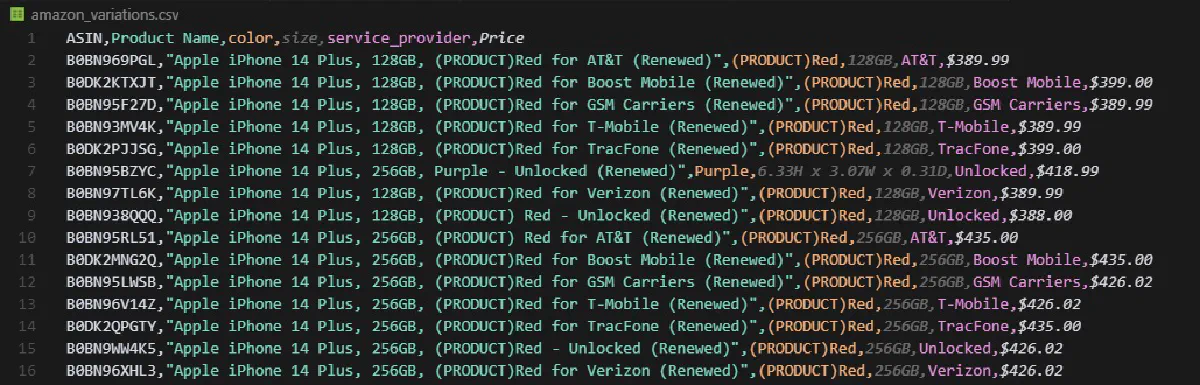
A clean, machine-readable CSV with one row per unique variation, each row tied to the actual ASIN, the exact selected options, and the price shown for that combination.
How to Scrape Seller Prices on Amazon
Most Amazon products have multiple sellers offering the same item at different prices, conditions, and shipping options.
This data is great for:
- Price comparison and arbitrage
- Identifying the Buy Box winner
- Monitoring competitor pricing
- Tracking seller reputation over time
And the good news is that Amazon exposes all seller offers through a hidden AJAX endpoint that returns structured HTML, so no heavy WAF bypass needed.
Finding the Seller Offers Endpoint
When you click "Other Sellers on Amazon" or the seller count link on a product page, Amazon loads seller data via an AJAX call.
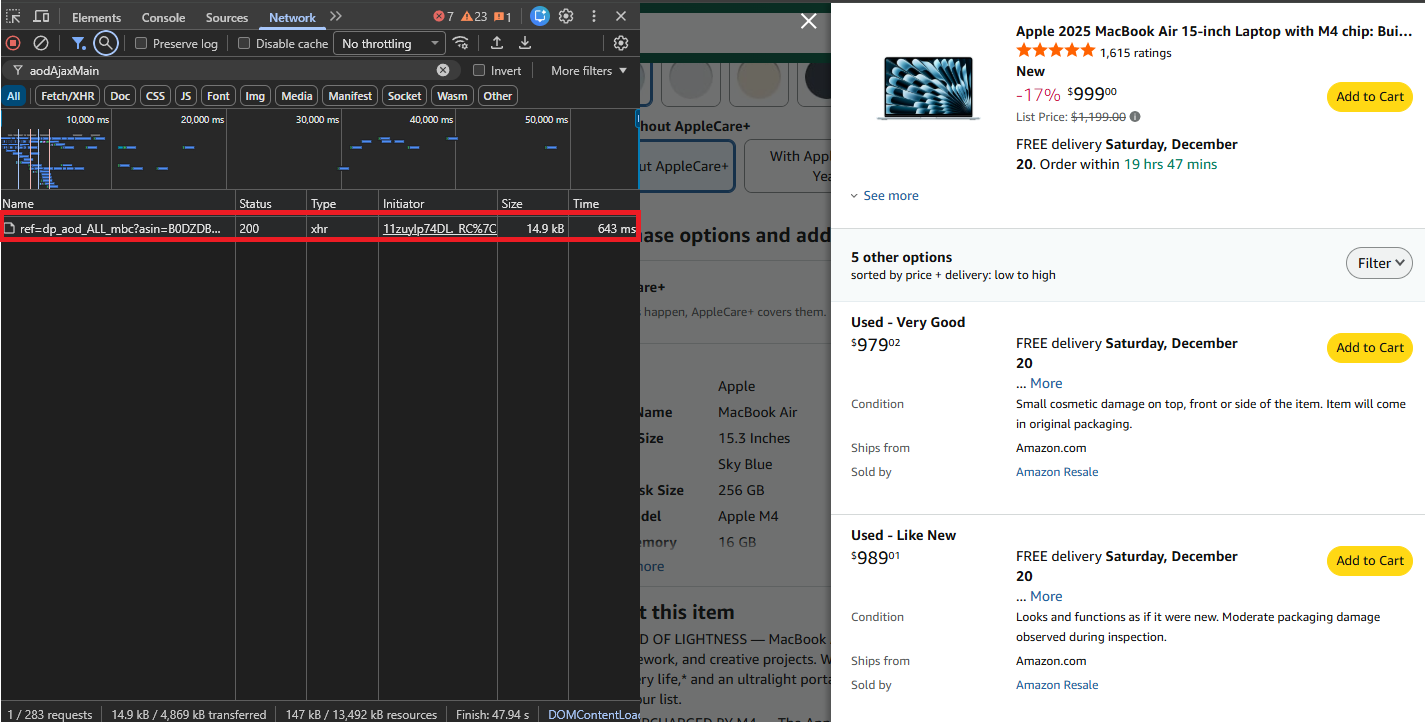
Open your browser's Network tab (F12 → Network), click on the sellers section, and you'll see a request to:
https://www.amazon.com/gp/product/ajax/aodAjaxMain/?asin={ASIN}This endpoint returns a semi-structured HTML response with all active offers for that product—much easier to parse than the full product page.
Build the Request
We'll use Scrape.do to fetch the seller offers page. The endpoint is lightweight and will sometimes allow access with simple HTTP calls, but routing through Scrape.do ensures consistent access:
import requests
import urllib.parse
from bs4 import BeautifulSoup
import csv
import re

# Configuration
token = "<SDO-token>"
asin = "B0DZDBWM5B"  # MacBook Air M4 as example

# Build API URL
target_url = f"https://www.amazon.com/gp/product/ajax/aodAjaxMain/?asin={asin}"
api_url = f"https://api.scrape.do/?token={token}&url={urllib.parse.quote(target_url, safe='')}&geoCode=us"

# Fetch and parse
soup = BeautifulSoup(requests.get(api_url).text, "html.parser")
Helper Functions
Before parsing, we'll create two helper functions to keep our extraction code clean:
def get_text(elem, default="N/A"):
    return " ".join(elem.get_text().split()) if elem else default

def find_match(pattern, text, default="N/A"):
    match = re.search(pattern, text) if text else None
    return match.group(1) if match else default
get_text safely extracts and normalizes text from an element, while find_match pulls specific values using regex patterns.
Parse Seller Offers
Each seller offer lives in a container with the aod-offer-soldBy div. We'll loop through all of them and traverse up to find the parent container that holds the price:
offers = []
for sold_by in soup.find_all("div", id="aod-offer-soldBy"):
    # Find parent container with price
    container = sold_by.parent
    while container and not container.find("span", class_="a-price-whole"):
        container = container.parent
    if not container:
        continue
Extract the price by combining whole and fractional parts—same pattern we used for product pages:
    whole = container.find("span", class_="a-price-whole")
    frac = container.find("span", class_="a-price-fraction")
    price = f"${whole.text.strip('.')}.{frac.text.strip()}" if whole else "N/A"
Get the seller name from the link to their storefront. If no link exists, it's Amazon selling directly:
    seller_link = sold_by.find("a", href=lambda x: x and "/gp/aag/main" in x)
    seller = seller_link.text.strip() if seller_link else "Amazon.com"
Extract seller reputation data including star rating, total ratings, and positive feedback percentage:
    rating_div = sold_by.find("div", id="aod-offer-seller-rating")
    rating_text = get_text(rating_div.find("span", class_="a-icon-alt")) if rating_div else ""
    count_text = get_text(rating_div.find("span", id=lambda x: x and "seller-rating-count" in str(x))) if rating_div else ""

    seller_rating = find_match(r"(\d+\.?\d*) out of 5", rating_text)
    rating_count = find_match(r"\((\d[\d,]*)\s*ratings\)", count_text)
    positive_pct = find_match(r"(\d+)%\s*positive", count_text)
    if positive_pct != "N/A":
        positive_pct += "%"
Get fulfillment details where it ships from and the item condition (New, Used, Refurbished, etc.):
    ships_div = container.find("div", id="aod-offer-shipsFrom")
    ships_from = get_text(ships_div.find("span", class_="a-color-base")) if ships_div else "N/A"
    condition = get_text(container.find("div", id="aod-offer-heading"), "New")
Build the offer object and add it to our list:
    offers.append({
        "ASIN": asin, "Price": price, "Condition": condition, "Seller": seller,
        "Seller Rating": seller_rating, "Rating Count": rating_count,
        "Positive": positive_pct, "Ships From": ships_from
    })

print(f"Found {len(offers)} seller offers for ASIN: {asin}")
Export to CSV
Finally, add the export logic to save all results to a CSV:
with open("amazon_seller_offers.csv", "w", newline="", encoding="utf-8") as f:
    writer = csv.DictWriter(f, fieldnames=list(offers[0].keys()) if offers else [])
    writer.writeheader()
    writer.writerows(offers)

print("Data exported to amazon_seller_offers.csv")
Running this on a MacBook Air listing returns sellers like Amazon, Adorama, and third-party resellers—each with their price, condition, rating, and fulfillment details:
Found 7 seller offers for ASIN: B0DZDBWM5B
Data exported to amazon_seller_offers.csv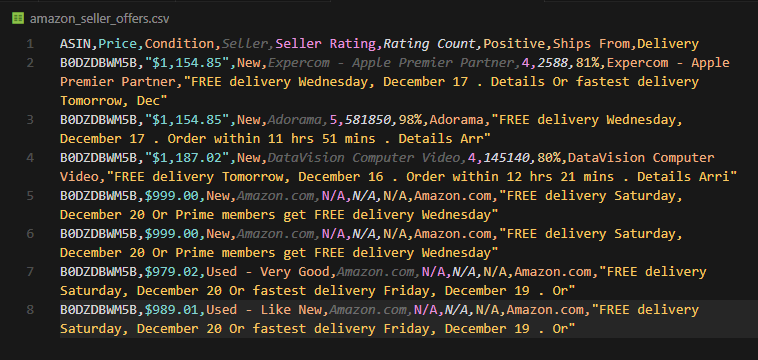
Now you have structured seller data ready for your workflows.
Or The Easy Way
Want structured JSON instead of parsing HTML? The Amazon Scraper API has an offer-listing endpoint that returns all seller offers in a clean format:
import requests

token = "<SDO-token>"
asin = "B0DZDBWM5B"

response = requests.get(
    "https://api.scrape.do/plugin/amazon/offer-listing",
    params={
        "token": token,
        "asin": asin,
        "geocode": "us",
        "zipcode": "10001"
    }
)

data = response.json()
print(data)
Sample response:
{
  "asin": "B0DZDBWM5B",
  "offers": [
    {
      "condition": "New",
      "merchantName": "Amazon.com",
      "listingPrice": {"amount": 999.00, "currency": "USD"},
      "shipsFrom": "Amazon.com",
      "isFulfilledByAmazon": true,
      "isBuyBoxWinner": true,
      "primeInformation": {"isPrime": true}
    },
    {
      "condition": "New",
      "merchantName": "Adorama",
      "listingPrice": {"amount": 1154.85, "currency": "USD"},
      "shipsFrom": "Adorama",
      "isFulfilledByAmazon": false,
      "isBuyBoxWinner": false
    }
  ],
  "status": "success"
}
Every seller offer with pricing, condition, fulfillment details, and Buy Box status—no parsing needed.
Next Steps
You've now got everything you need to scrape product data, all variations, and seller offers from Amazon.
But there's more data to extract. Here's where to go next:
| What You'll Extract | Guide |
|---|---|
| Search results, sponsored products, and related searches | Scrape Amazon Search Results |
| Top 100 best-selling products by category with rankings | Scrape Amazon Best Sellers |
| Customer reviews and ratings at scale | Scrape Amazon Reviews |
Each guide follows the same pattern: find the right endpoint, parse the HTML, and export to CSV.
And if you want to skip the parsing entirely, Scrape.do's Amazon Scraper API returns structured JSON for products, search results, and seller offers—with ZIP code geotargeting built in.
Start scraping today with 1000 free credits.
Frequently Asked Questions
Can you scrape Amazon for prices?
Answering this question from two different angles; yes, it is legal to scrape product prices on Amazon because they're public data and yes, even a beginner developer can easily scrape them following this guide using Python.
How do you retrieve data from Amazon?
You can easily retrieve data from Amazon in 3 steps:
- Use a web scraping API or a stealth plugin to bypass Amazon's firewall,
- Write a code in your preferred programming language that retrieves HTML responses and parses the data you want (more info in this guide)
- Input your target URLs and automate the process using workflows.
Is Amazon easy to scrape?
Amazon is not easy to scrape at all. If you're trying to scrape without an existing scraping operation to handle anti-bot restrictions and proxies you'll instantly get blocked. If you use a scraping API that is known to handle Amazon's WAF, however, it can become quite simple to extract data from Amazon.
Does Amazon have anti-scraping?
Yes, Amazon uses AWS WAF as it's firewall to block all bots including scrapers. It analyzes your IP, headers, and activity to make sure you're a regular human browsing the website; and if you're not you're blocked instantly.
Software Engineer